QUESTION 139
You have a multi-container Pod that runs a web server (Nginx) and a database (MySQL) container. The database container requires data to be initialized before the web server container can Stan. How would you configure the Pod to ensure the database container is initialized before tne web server container starts?
See the solution below with Step by Step Explanation.
Explanation:
Solution (Step by Step) :
1. Use initContainers:
– Define one or more ‘initContainers’ within the Pod’S ‘spec.template.spec’ section.
– The ‘initContainerS will run before any other container in the Pod.
– In this case, you would create an ‘initcontainer’ for the MySQL database.
2. Configure the initContainer:
– The ‘initcontainer’ should have the following attributes:
– Name: A unique name for the container.
– Image: The Docker image containing the necessary tools to initialize the database.
– Command: The command to execute for database initialization.
– LivenessProbe: Optional, but recommended to check if the database initialization process is successful.
3. Sequence the containers:
– Ensure the ‘initContainers’ are listed before the main containers in the Pod’s ‘spec-template-spec-containers’ section.
4. Exam le YAML:
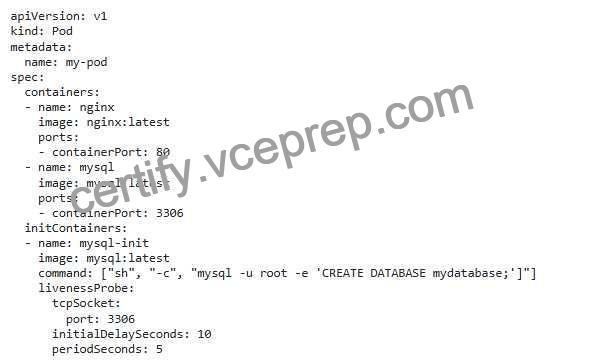
– The ‘mysql-init’ ‘initcontainer’ will run before the ‘nginx’ and ‘mysql’ containers- – The ‘command’ in the ‘injtContainer’ Will create a database named within tne MySQL container. – The livenessprobe’ will ensure that the database iS reachable on pon 3306 atter the initialization process completes. Note: This solution assumes that the ‘mysqr image already includes the necessary database initialization tools. You might need to use a custom image with these tools if the default image doesn’t provide them.,


